Simple and advanced searching tools are available for most DevMan modules to assist with your reporting needs.
•Use basic Search page filters to find data within a specific module.
•Use Search advanced to build more complex filter combinations.
•Save searches so you can reuse them or share them with your team.
•Once your search is completed, view results in a grid, and if needed, adjust filters to narrow down what is displayed. |
•Use basic Search when data comes from a single source.
•Use Search advanced when you need complex filtering or data from multiple sources.
•Use grid filters to quickly refine results when working with a smaller result set, for example, finding emails from a specific sender.
•Grid filtering is especially efficient after an initial search has already narrowed the results. |
We have added a powerful enhancement to the inline search feature to ensure faster and more accurate results.
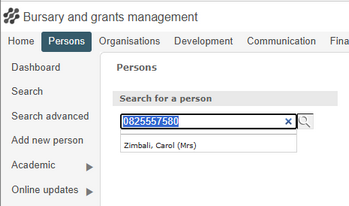
You can now search for contacts directly using an email address or cell number.
This is especially helpful when dealing with large groups.
On the Persons or Organisation page, simply type the email address or cell number to search for a specific contact.
|
•If you want to view all results from A to Z, type %%% in the search field. |
|
Search advanced and saved searches
•When viewing results on a grid, use filters to further narrow down your search. |
|
Create a published report |